| DeltaCAD is 2d only, but has a scripting language, works on Windows 8, I have not tried Windows 10 or 11. But these macros do not work on Apple computers as DeltaCAD uses a different scripting language on Apple computers. DeltaCAD's main web page is here Carl Sabanski's DeltaCAD page is here FREE DIAL MACROS ~ The benefit of DeltaCAD is its scripting, and here are some of mine for horizontal and vertical dials for north/south latitudes with longitude correction, the meridian dial both east and west, a horizontal dial with calendar lines, and an equatorial dial, N and S plates, calendar circles and sunrise/set lines, a polar dial, shepherd's dial, and the winged azimuth dial. Play with them and have fun, their suffix is ".bas". But also check out NanoCAD and FreeCAD, free and programmable. Note: FreeCAD is free and is programmable using Python, see my Python macros here. Note: NanoCAD is free, programmable using VBS, Java Script, and LISP. See my VBS and Java Script macros here. NOTE ~ I use my own abbreviations as I found no standard ones. h(horizontal), v(vertical), p(polar), m(meridian), z(azimuth), q(equatorial), etc |
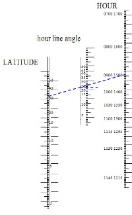
| NEW SINGLE MACRO ~ ~ ~ nomograms for h, and v dials ~ full description is here DIAL NOMOGRAMS FOR HORIZONTAL AND VERTICAL DIALS, NOTES, AND A DELTACAD MACRO FOR THEM, also covered are the polar and meridian dial with calendar data, and for the vertical decliner, SD, SH and DL. Notes show how to use SH and DL for a surrogate horizontal dial, and thus avoid a much more complex nomogram that would use the full vertical decliner hour line nomogram.bas Very good notes on nomogram are in the big book, as well as in the book that comes with the big book as a download, Supplemental Shadows which are excellent. |
| D e l t a C A D for Windows not Apple |
| NOTE: Most dial programs are collected together so a main menu selects a sub program. NOTE: Many of the dials above including the Shepherd and Azimuth dials are animated ~ great education tool to see how hour lines, shadows, and calendar/declination lines move as latitude automatically steps up, or to see how the shadow follows a calendar curve. The vertical decliner will also animate if dec set to 0, see how hour lines, SD, and SH vary with declination. Do not use animation mode if you are epileptic. NOTE: The calendar curves program can be used to draw calendar lines for any hour angle dial. The design latitude for the "calendar curves" is the SH of the actual dial, and the "noon" line of the "calendar curve dial" is placed on the SD line of the actual dial. Pay attention to the SSL or GLH to make sure you are using the correct distance. Pay attention to longitude correction, the best method is to use the calendar line points as angle from SD and distance with no longitude correction, and transpose the results to the vertical dial's SD. These are tools, and are a good blend of applying knowledge using tools at the higher levels of learning, rather than doing things by rote. HOW TO PROGRAM DELTACAD MACROS ~ Programming Shadows also has code for certain dials in other languages so you may compare programming languages, and techniques. Even covers the legacy languages! But wait, there's more - even the legacy computers, with simulators I wrote that include assemblers, linkers, and executors for the included sundial programs I also wrote for the IBM 1401 and IBM 360. My IBM 1401 and 360 simulators (written as GUI in Lazarus - a Pascal open source implementation) I included tracing, core dumps, and instruction stepping, etc. |
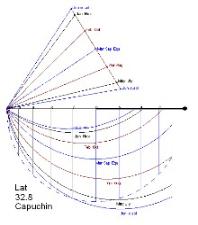
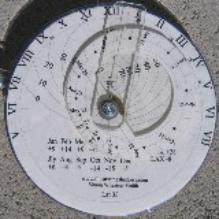
| DeltaCAD Cappucin plate |
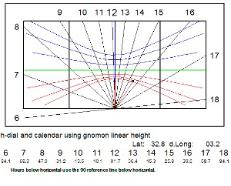
| wide gnomon on a horizontal dial MAIN-h-dials.bas see also Carl Sabanski's Sundial Primer page |
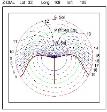
| DeltaCAD winged azimuth |
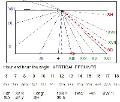
| DeltaCAD vertical decliner |
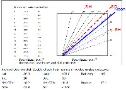
| The inclined decliner |
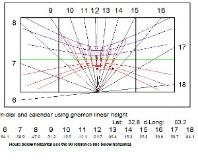
| A DeltaCAD horizontal dial with calendar curves and with the analemma - also have a vdial with analemma |
| SINGLE MACRO ~ ~ ~ HOUR ANGLE DIAL TYPES - a, q, p, m, h, v, and v-dec ~ full description is here DIAL PLATES WITH ANALEMMAS, CALENDAR CURVES, AND LONGITUDE ADJUSTED HOURS ALL IN ONE MACRO analemma.bas Very good notes on analemmas, however, the notes provided with Illustrating Time's Shadow are best. Analemma figures for both dial plates and gnomon almost all dial types, quick intro see this page also see Excel this one zip file has all analemma material |
| SINGLE MACRO ~ ~ ~ calendar curves ~ full description is here Like analemma.bas above except no analemmas, but much better control over calendar curve declinations. |
| SIMPLEST MOST COMMON DIALS MACRO Download this ZIP file and use:- cubicShadows.bas for simplest horizontal, vertical, meridian dials, calendar curves, EOT & decl info, and almanac. THE ULTIMATE MACRO COLLECTION Download this ZIP file for all other dial variations. The hDial choice 3, vDial choice 7 support azimuth and altitude dial furniture. Italian hour lines asr curves for Islamic afternoon prayers analemmas altitude, including the Astrolabe macro azimuth calendar or solar declination curves DIAL FURNITURE The furniture macros here are for everyone, however, the dial furniture macros in this zip file also has notes on such things and is only provided when you acquire the big book in any form (printed, or CD, or online download) |


| DeltaCAD v-dial macros: MAIN-v-dials.bas & MAIN-v-dials[f].bas had a typo in choice 7, legend said LAT when it should show LAT and COLAT. |

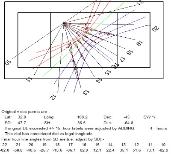
| The vertical decliner choice in the analemma as well as the vertical dial DeltaCAD macros. |
| ALTITUDE DIALS Cappucin dial alt-cappucin.bas Cappucin dial planispheric astrolabe alt-astrolabes.bas the planispheric astrolabe generator ~ and notes on formula derivation shepherd's dial alt-shepherds.bas Shepherd's dial using true declinations not fixed ones, animated both single and dual gnomon (long for winter short for summer) AZIMUTH DIALS winged azimuth dial azi-winged-azimuth.bas Summer/equinox/winter hour lines [can animate] HOUR ANGLE DIALS simple bi-filar h dial MAIN-bifilar.bas Bi filar dial (h-dial with hour angles of 15 degrees) with a gnomon as two wires of differing heights horizontal dial MAIN-h-dials.bas Horizontal dial, longitude/latitude specific, and for north or south hemisphere, and calendar lines & gnomon based on sub-style length [can animate hour-lines w latitude], and sub style length is fixed - gnomon linear height varies. And a horizontal dial whose shadow is animated using a given solar declination, thus can do calendar lines and curves for h-dials, and so on and on and on. 24 hour h-dial, Roman/Arabic. Ceiling dials. Analemmas. But see this page for the best DeltaCAD analemma software. cubicShadows.bas 24 hour horizontal dial, equinox line, but true quadrant sensing inclined decliner MAIN-inc-dec.bas Inclined decliner dial plate design. meridian dial MAIN-m-dials.bas Meridian dial constrains the hour lines to the calendar lines meridian dial true east and west inclined dial polar dial MAIN-p-dial.bas with calendar lines and longitude adjusted equatorial dial MAIN-q-dial.bas with calendar circles and sunrise/set lines longitude adjusted vertical dial MAIN-v-dials.bas Simple vertical dials, declining & non declining , both hemispheres, vertical declining dial, and if you enter declination of 0 it is animated, north hemisphere only vertical decliner for north or south hemisphere, with declinations so the dial faces largely east or west vertical declining dial but facing the pole, not equator vertical declining dial for mostly east or west alignments , and so on and on and on. Roman/Arabic. vertical decliner with calendar curves and analemmas longitude corrected, matches the analemma program. cubicShadows.bas 24 hour vertical dial, true N or S, equinox line, true quadrant sensing MISC DIALLING AIDS calendar lines/curves MAIN-calendar-curves.bas calendar curves for a V or H dial using SH analemma.bas for analemmas on all dial kinds, see separate info box above. almanac and tables MAIN-almanac-tables.bas EOT (2 and 3 wave), Declination (small formula), as tables and graphs and other functions such as sunrise and sunset etc, and a daily almanac. Also consider, nomogram.bas to build nomograms for some dialling functions, see separate info box above. |
| OTHER SPECIAL PURPOSE MACROS ~ HOUR ANGLE, ALTITUDE, AND AZIMUTH DIAL TYPES ~ full description is here |
|
|
| All my macros and programs are free for NanoCAD, FreeCAD, PowerDRAW, DeltaCAD |
| Download Programming Shadows, it is free, and has many hints to get you up to speed on many languages |
| DeltaCAD h-dial animated |
| "Spider H Dial" with the analemma as two S curves from Jan to Dec 31, minor improvement to 3 wave EOT, and wide gnomon dials Illustrating Time's Shadow chapter 25 for analemmas, and chapter 12 and Supplemental Shadows for wide gnomons, |
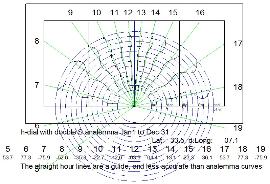
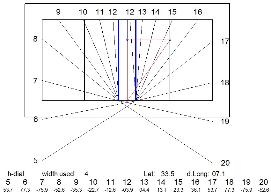
| Spider H dial with the analemma as two S curves Jan 1 to Dec 31. In the "MAIN-h-dials.bas" and "analemma.bas" macros. Also has wide gnomon version. |

| DeltaCAD Shepherd's dial |
| DeltaCAD is no longer available, but existing users can still use DeltaCAD and thus existing DeltaCAD macros. |