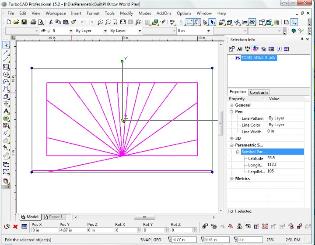
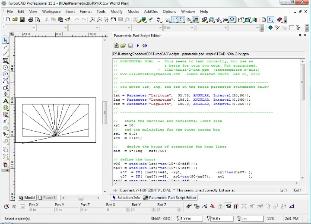
| TurboCAD Deluxe (has full 2d and 3d modeling) ($99 when on sale, $149 other times) their main web page is here (IMSI), or here just for TurboCAD only TurboCAD Professional also adds support for VBS scripts, and starting with v15.2 it also supports a simpler scripting for an entity called parametric parts scripting. This page has code for vbs (h and v dials), and parametric scripting for an h-dial. FREE ~ pse script (PPM PSE) for TurboCAD Professional (new support on version 15.2) for the horizontal dial. These are like the DeltaCAD scripts. Programming notes are here, and include three versions of the h-dial, the basic, intermediate, and advanced one using "IF" logic. If you only have TurboCAD Deluxe, call and ask for a "competitive upgrade", they often let you upgrade to Professional for much less than a straight purchase. May not work, but worth a try. PSE PPM scripts that generate objects in a drawing, and saved, and later reloaded, can be SELECTED and with VIEW SELECTION INFO, their parameters can be changed without changing the code, and the drawing will automatically redraw itself. This is a significant step forward in CAD programming. Here is the TurboCAD drawing of an h-dial as a PSE object, open it, SELECT it, VIEW SELECTION INFO, then locate the parms and change them, watch the picture change itself. This requires TurboCAD Professional 15.2 or greater. FREE ~ VBS scripts for TurboCAD Professional (tested on versions 11, 12, 14, and 15) for the horizontal and the vertical decliner dials. These are like the DeltaCAD scripts. Programming notes are here. If you only have TurboCAD Deluxe, call and ask for a "competitive upgrade", they often let you upgrade to Professional for much less than a straight purchase. May not work, but worth a try. KEY POINT: The parametric script support added in version 15.2 is a positive move to simpler programming, and TurboCAD has said in their notes that the language will be extended. However, with to regard to earlier language support, TurboCAD took the approach of using Microsoft's languages rather than the approach taken by DeltaCAD which was to integrate a stable third party vendor's BASIC package. While this may have simplified TurboCAD's work, it must be remembered that Microsoft has dropped languages which reduced the options available to the programmer writing TurboCAD scripts. Then, the languages themselves are not stable, they evolve as much as does JAVA, so features may become obsolete, making maintenance an issue for someone programming scripts for TurboCAD. Finally, the programming option is only available in TurboCAD Professional, which costs much more than the TurboCAD Deluxe variant. All these factors, combined with the ease of DeltaCAD stable BASIC programming platform have made DeltaCAD the standard for the sundial community. If you still want to program for TurboCAD, then these notes here are very helpful. The lack of stability in TurboCAD language support is why Illustrating More Shadows does not show TurboCAD VBS scripts, whereas sample scripts are provided for all the other language based systems: DeltaCAD, Visual BASIC, JAVA, and even Pascal, C, FORTRAN and so on. However, TurboCAD scripting does provide for 3d models to be built. TurboCAD scripting is much slower than DeltaCAD scripting, thus animation is less viable in TurboCAD than in the animation available in the Illustrating Shadows DeltaCAD macros. Also, see my LISP page for programmable free CAD from ProgeSOFT. If you have the Cortona VRML plugin (if not, get it free with this link or on the avi page) click here (220k wrl) or here (22k wrz) for the picture to the left to come up as a user rotatable vrml model. it was built from the v-dial and h-dial macros. FREE ~ Also, use the solar travel mesh (solarMesh.tcw). The solar travel mesh makes lighting easy with CAD models and enables correct shadows for a time and date. These notes here show how to use the mesh. Updated Oct 13, 2009 FREE ~ CAD TCW files are here built with TurboCAD deluxe, a 3d modeller that is more economical than other packages. It also has an optional animation package, see here for animated CAD examples, and the models used for them are on the main CAD page here. This page also has not only TCW files, but also some DXF, some JPG, and some CAD (CADstd) files. The animated CADs are not as good as the animated vrml, but useful nonetheless in a classroom setting. CAD files for designing an astrolabe for latitude 33, you can modify it, and also a latitude mesh being a hemisphere. Check CALCULATING SHADOWS for tips on how to use 3d CAD to design dials vrml worlds (built with ISB and ISA), and vrml models (built with TurboCAD saved as wrl version 2) are on this page here (they need the Cortona vrml plugin which is the industry vrml viewing standard) |
| ILLUSTRATING SHADOWS version 15.2 of TurboCAD Professional now supports parametric scripting which is simpler than their VBS support, see the h-dial script and notes below... this has many benefits and is very easy to program |
| Book purchase options are here... |
| Email comments or questions to the author at: illustratingshadows at yahoo dot com |
| Python page is here (alternative to JAVA) |
| SPREADSHEETS are here OPEN OFFICE versions here |

| Above is one of a number of vrml models that you can view and rotate etc with the industry standard Cortona browser plugin. Case study .zip file has pdf and vrml files. |
| TurboCAD macros similar to the DeltaCAD macros Some notes on these VBS scripts in TurboCAD TurboCAD PSE scripts and notes A solar lighting mesh with notes on using it |

| Octave (free and powerful) |
| Scilab (free and powerful) |
| Euler (free and powerful) |
| this in vrml [Cortona] this as a 3d stereoscope this in tcw form for TurboCAD |
| FORTRAN program using the free system is here |

| solarMesh.tcw |
| Illustrating Time's Shadow ISBN 0-9765286-8-1 plus 0-9765286-9-X Lib Cong 2005900674 plus 2006930654 Merges Illustrating Shadows and Illustrating More Shadows, deletes duplicated material, and techniques that are complex and replaced by easier methods, adds new material. Hands on, empirical, geometric, trigonometric, CAD, and spreadsheet dial design for small dials plus garden dials using common masonry supplies, clay, and glass, with emphasis on many calendar line techniques, and inclined decliners, while providing details on the use of DeltaCAD programming including the animation of many sheets as parameters vary. Case studies abound with associated problems solved, and cover the infamous inclined decliner, as well as all the other kinds of outdoor dials. The printed book comes with a CD of booklets, spreadsheets, VRML/WRL files, templates, etc with the printed book. The CD has all books and booklets and programs along with source code. You can get the printed book and CD, just the CD, or an online download here. |